Refreshes the existing listing
The original listing remains the same listing, and its existing age may still be shown.
 Marketplace AssistantAdd to Chrome
Free Chrome extension for independent auto dealers
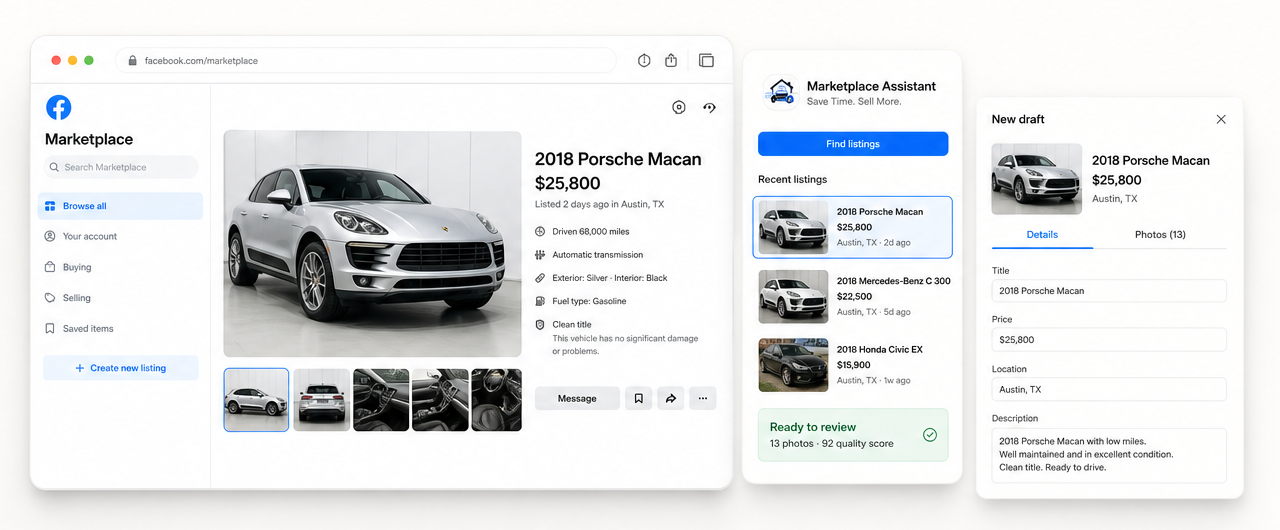
Facebook Marketplace listing software for independent auto dealers. Copy VIN, supported vehicle details, price, description, location and up to 20 photos from an existing listing into a separate fresh draft. Review everything before publishing.
Not the same as Facebook Relist
Facebook Relist refreshes an existing listing. Marketplace Assistant copies your vehicle into a separate draft that you can inspect, edit and publish yourself.
The original listing remains the same listing, and its existing age may still be shown.
After you review and manually publish it, Facebook can display the new listing as “Listed just now.”
Marketplace Assistant does not guarantee ranking, views, inquiries or sales.
Why relist your listings?
Older Marketplace listings naturally receive fewer views over time. Creating a fresh draft can give your listing another opportunity to appear in front of interested buyers.
Fresh drafts may appear higher in recent Marketplace results, helping more buyers discover your listing.
More visibility can lead to more messages, inquiries and potential buyers.
Giving your listing another opportunity to be seen may help reduce the time it takes to sell.
Visibility and selling results vary by listing, location, demand and Facebook ranking signals.
See how much time you save
Move the repetitive work out of your day while keeping the final decision in your hands.
What gets copied
Marketplace Assistant prepares the repetitive parts of a fresh draft while leaving the final checks and publishing decision to you.
Complete control. Marketplace Assistant never publishes listings automatically.
Security by design
The extension works with Marketplace already open in your browser. It does not ask for your Facebook credentials or take the final action for you.
No Facebook password required
✓Works inside your existing Facebook session
✓Nothing is published automatically
✓You review everything before posting
✓Data stays on your computer whenever possible
✓Product demo
Watch how a Marketplace listing becomes a new draft in less than 30 seconds.
Seller resources
Use these practical guides to improve the parts of Marketplace selling that still require your judgment: inventory preparation, listing review, photos, and publication.
Compare the capabilities that matter to independent auto dealers: vehicle data, photos, review controls, account access, and final publishing.
Read the guide →Automation guideSee which repetitive vehicle-listing steps can be automated while final review and publishing stay under dealer control.
Read the guide →Relisting guideFollow a review-first process for copying an active vehicle listing into a new Marketplace draft.
Read the guide →Photo checklistUse a repeatable exterior, interior, odometer, feature, and condition photo plan for every vehicle.
Read the guide →No. Marketplace Assistant works inside your existing Facebook session and never asks for your Facebook password.
No. The extension prepares a draft. You review every field and photo, then decide whether to publish it.
It is optimized for vehicle listings and also supports selected general Marketplace item categories.
No. Videos are not copied. Video preview frames are detected and skipped so they do not appear as duplicate photos.
Listing data is processed for the workflow and stays on your computer whenever possible. See the Privacy Policy for complete details about optional account, support and diagnostic features.
Yes. The new listing is left as a Facebook draft so you can edit the information, photos and optional fields before publishing.
Save Time. Sell More.
Turn an existing Marketplace vehicle listing into a separate draft in just a few clicks.
Add to Chrome — Free ↗