Facebook Marketplace automation

Automate repetitive vehicle listing work without giving up control.

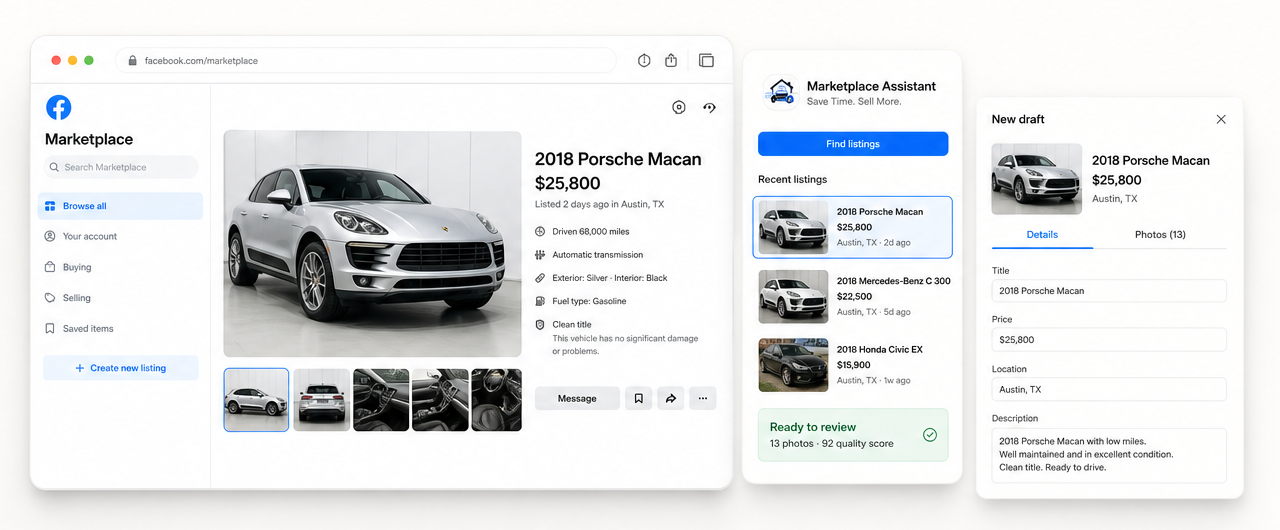
Marketplace Assistant helps independent auto dealers copy supported details and photos from their own active Facebook Marketplace listing into a fresh draft. The extension handles repetitive transfer work; your dealership verifies the vehicle and makes the final publishing decision.

  • No Facebook password required
  • No automatic publishing
  • Draft remains editable
Facebook Marketplace listing automation moving vehicle details and photos into a fresh draft

Practical automation

Automate repetition, not responsibility.

Safe dealership automation should reduce duplicate data entry while preserving the checks that protect listing accuracy. Marketplace Assistant prepares the draft instead of pretending every field can be trusted without review.

Automated by Marketplace Assistant

Repetitive workflow steps

  • Find active listings available to your signed-in account
  • Read supported vehicle details from the selected listing
  • Collect up to 20 available original photos
  • Open a fresh Marketplace creation form
  • Fill supported fields into a reviewable draft
  • Show progress and leave the final decision to you
Completed by your dealership

Accuracy and final actions

  • Confirm the vehicle is still available
  • Verify VIN, mileage, price, condition, and location
  • Review category and optional Facebook fields
  • Check photo accuracy and order
  • Correct anything that changed
  • Perform the final Publish or Delete confirmation

How it works

A review-first listing automation workflow.

The extension works inside Chrome while your dealership is already signed in to Facebook Marketplace. Facebook currently needs to be set to English (US).

01

Open your selling page

Marketplace Assistant identifies active listings available to the Facebook account currently signed in.

02

Select a vehicle

The extension reads supported listing details and collects up to 20 available original photos.

03

Build the draft

A fresh Marketplace form opens and supported information is entered automatically where it can be identified.

04

Verify and decide

Your dealership checks the result, updates changed information, and chooses whether to publish.

Clear limits

What this automation does not do.

No automatic posting

The final Publish action remains manual. Marketplace Assistant leaves the completed form open for review.

No buyer messaging

The extension does not contact buyers, negotiate prices, or manage Marketplace conversations.

No password collection

It works with the existing browser session instead of asking for Facebook credentials.

No guaranteed results

Automation can save repetitive work, but it cannot guarantee ranking, visibility, inquiries, or sales.

Automation FAQ

Know exactly what stays automated and manual.

Can Facebook Marketplace listings be fully automated?

Marketplace Assistant intentionally stops at a reviewable draft. It does not perform the final Publish action, because vehicle facts and optional Facebook fields still require human verification.

Does Marketplace Assistant require my Facebook password?

No. It works inside the Facebook session already open in your Chrome browser and does not ask you to provide your Facebook password.

What listing work does the extension automate?

It automates repetitive transfer work: finding your active listings, collecting supported details and available photos, opening a new form, and filling a fresh draft for review.

Is this automation designed for auto dealers?

Yes. The primary workflow is designed for independent auto dealers who manage their own active vehicle listings on Facebook Marketplace.

Does automation guarantee more views or vehicle sales?

No. A fresh draft may create another opportunity to be discovered, but Facebook controls distribution and no ranking, inquiry, or sale is guaranteed.

Review-first automation

Stop rebuilding the same vehicle listing by hand.

Turn your own active Marketplace listing into a fresh, editable draft in just a few clicks.

Add to Chrome — Free